Awesome CV Latex Template
Awesome CV Latex Template - Modern Design
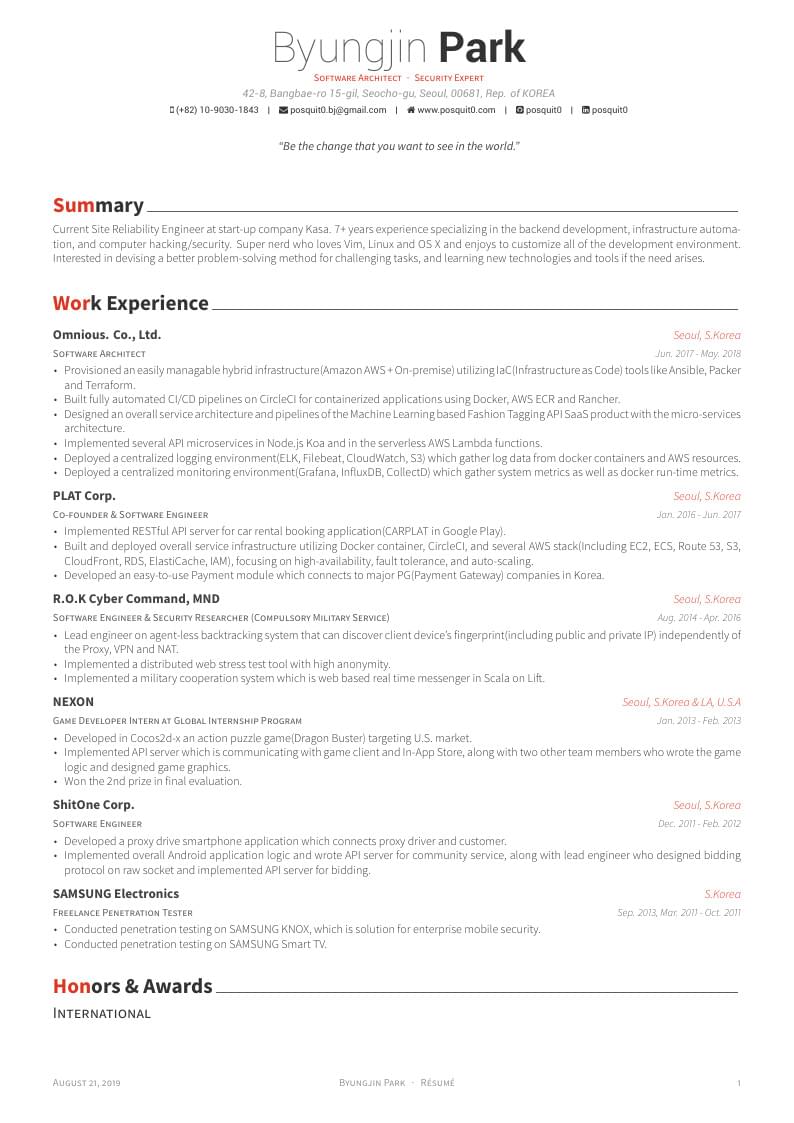
Awesome CV is LaTeX template for a CV (Curriculum Vitae) or resume inspired by Fancy CV. It is easy
to customize your own template, especially since it is really written by a clean, semantic markup.
This template has been downloaded from: https://github.com/posquit0/Awesome-CV
Author: Claud D. Park
Authorship & License
- Author : Claud D. Park
- License : Creative Commons CC BY 4.0
 EasyLaTeXResume Link for no Code Latex Template Edit
Github Link for source code Preview PDF
How to Use This LaTeX Resume Template
- Download the complete LaTeX resume template package with all source files
- Open the main LaTeX resume file (main.tex) in your preferred LaTeX editor like Overleaf
- Replace the sample content with your personal information and work experience
- Customize the LaTeX CV template colors, fonts, and layout as needed
- Compile the LaTeX resume template to generate your professional PDF resume
- Review the final LaTeX resume format and make any necessary adjustments
Fonts & Typography
- Header & Name: Large, bold, and centered for immediate visibility
- Body Text: Professional sans-serif fonts (customizable in the template)
- Quotes & Highlights: Italics or colored text for emphasis
Layout & Structure
- Single-column Layout: Main content and dates/social info separated for clarity
- Section Highlighting: Optional colored sections using Awesome Colors
- Footers & Headers: Custom footer with page numbers, names, and date
- Flexible Sections: Easily add or remove sections like Experience, Education, Writing, etc.
Customization & Features
- Change color scheme with predefined Awesome Colors or custom hex codes
- Adjust margins, page size, and spacing via geometry settings
- Supports importing separate .tex files per section for modular editing
- Easy to maintain and version-control using Git or Overleaf